Duration
8 - 12 Weeks
(Self-Initiated Project)
My Role
Business Analyst · UX Researcher · Product Designer
Tools
Figma, Google Forms, Excel,
Notion
Background
Many vocational schools serving low-income and rural communities face a silent failure mode: students disengage, attendance collapses, grades deteriorate, and yet promotion decisions are still made based on incomplete, fragmented, or purely compassionate judgment.
In practice, homeroom teachers are expected to monitor dozens of students, track attendance manually, manage grades on paper, and intervene when problems occur — often without any real-time visibility into who is silently falling behind. As a result, early warning signs are missed, interventions happen too late, and teachers are forced to rely on memory, intuition, or informal notes to make high-stakes decisions about student progression.
This case study focuses on translating an early-intervention framework into a concrete product: a student risk dashboard, alert system, and parent communication interface.
The goal of the product is not to punish or monitor students, but to help homeroom teachers detect risk earlier, prioritize attention, communicate more effectively with parents, and intervene before disengagement becomes permanent.
This project is part of a two-part case study:
• Part 1 — System Design, Governance & Data Architecture
• Part 2 — UX, Dashboards & Product Implementation
Problem Framing
Problem Space
In many vocational schools serving low-income and rural communities, student disengagement does not happen suddenly — it unfolds slowly through falling attendance, declining grades, and unresolved personal difficulties. In practice, however, these signals are recorded in fragmented, paper-based systems: handwritten attendance sheets, isolated grade books, and informal teacher notes.
As a result, risk is usually detected too late — often during promotion meetings, when it is already difficult to intervene meaningfully. And on the meeting, homeroom teachers are expected to act as early-warning sensors for student disengagement — yet they are given no tools to see risk patterns in real time.
This creates three UX-level problems:
• No real-time visibility into student risk
• No prioritization of which students need attention
• No structured record of past interventions or parent communication
As a result, interventions happen reactively rather than proactively, and high-stakes decisions are made without a clear evidentiary trail.
Target Users
The product was designed primarily for homeroom teachers, with supporting roles for subject teachers and parents.
Homeroom Teacher (Primary User)
Needs a calm, simple interface to monitor student attendance and performance, identify early warning signs, prioritize attention, communicate with parents, and log interventions.
Constraints:
• Low digital literacy
• High workload
• Limited time
• Emotional burden of welfare decisions
b. Subject Teacher (Secondary User)
Needs a lightweight interface to input grades, view subject-specific performance, and flag academic concerns.
c. Parents (Tertiary User)
Needs a simple communication channel to receive alerts, provide explanations, and respond to teachers
Design Goals
This product was designed as a decision-support system, not a disciplinary or surveillance tool. The primary goal is to help homeroom teachers:
• detect early disengagement
• understand why a student is at risk
• communicate with parents sooner
• log humane interventions
• coordinate follow-up actions
It explicitly avoids:
• automatic punishment
• dropout prediction percentages
• ranking or labeling students as “failures”
• replacing human judgment
The system treats attendance and academic performance as care signals — not as compliance metrics.
User Stories & Product Scope
Primary User Stories
The following user stories defined the minimum viable scope of the product.
US-1: Monitor Student Risk
- As a homeroom teacher
- I want to see which students are at risk
- So that I can prioritize my attention and intervene early.
US-2: Detect Attendance Collapse
- As a homeroom teacher
- I want to be alerted when a student is absent for 3 or 6 consecutive days
- So that I can contact parents and investigate the cause.
US-3: Track Academic Deterioration
- As a homeroom teacher
- I want to see declining performance trends
- So that I can intervene before failure becomes permanent.
US-4: Communicate With Parents
- As a homeroom teacher
- I want to message parents inside the system
- So that all communication is logged and auditable.
US-5: Log Interventions
- As a homeroom teacher
- I want to record what actions I’ve taken
- So that future decisions are based on history, not memory.
Core Tasks
From the user stories, five core tasks were defined.
T-1: Review Risk Dashboard
• See prioritized student list
• Identify soft and critical alerts
T-2: View Student Profile
• Attendance history
• Performance trends
• Risk score
• Past interventions
T-3: Send Parent Message
• Triggered from alert
• Pre-filled humane template
• Logged automatically
T-4: Log Intervention
• Record home visit
• Record phone call
• Record welfare context
T-5: Close Alert
• Mark issue as resolved
• Add resolution notes
Product Scope & Boundaries
The system was deliberately constrained to avoid feature bloat and governance overreach.
Included:
• Attendance tracking
• Grade input
• Risk scoring
• Alerts
• Parent messaging
• Intervention logs
Explicitly Excluded:
• Automated promotion decisions
• Student surveillance features
• Behavioral punishment systems
• Teacher performance ranking
• Predictive expulsion tools
UX Structure
Screen Inventory
The MVP product was intentionally limited to a small number of high-leverage screens that support the homeroom teacher’s real-world workflow.
S-1: Login Screen
• Role-based access (homeroom / subject / principal)
S-2: Homeroom Dashboard (Primary Screen)
• Prioritized student risk list
• Soft and critical alerts
• Quick filters (class, risk level)
S-3: Student Profile
• Attendance history
• Performance trends
• Risk score
• Past interventions
• Parent messages
S-4: Alert Detail Screen
• Trigger reason
• Timeline of deterioration
• Recommended actions
• Parent message CTA
S-5: Parent Messaging Screen
• Two-way chat
• Message templates
• Conversation history
S-6: Intervention Log Screen
• Action type
• Notes
• Timestamp
• Close alert CTA
Primary User Flow (Homeroom Teacher)
This flow represents the most critical path of the product: from silent deterioration to human intervention.
Step 1 — Open Dashboard
• Teacher logs in
• Sees prioritized student risk list
Step 2 — Alert Triggered
• Student crosses soft or critical threshold
• Alert appears on dashboard
Step 3 — Review Student Profile
• Teacher clicks student
• Reviews attendance + performance trends
Step 4 — Send Parent Message
• Teacher clicks “Contact Parent”
• Uses humane template
• Message is logged
Step 5 — Log Intervention
• Teacher records action
• Adds context notes
Step 6 — Close or Monitor Alert
• Teacher closes alert
• Or keeps it open for monitoring
Screens & Wireframe Logic
UX Strategy
The UX was derived directly from institutional realities such as overloaded teachers, digital literacy varies widely, emotional labor is high, and decisions are socially sensitive. So, instead of building a feature-rich product, the UX focuses on three humane workflows:
See risk early
Understand what is happening
Take and log a concrete action
This led to a deliberately minimal interface composed of only three core screens:
• Homeroom Dashboard
• Student Profile
• Log Intervention
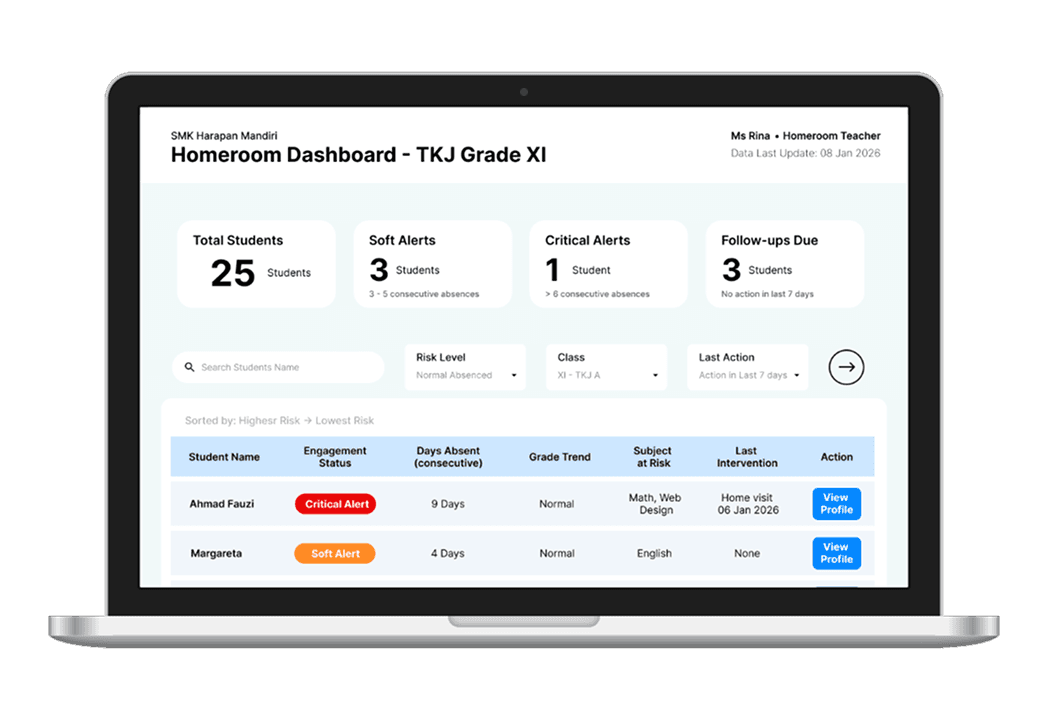
Homeroom Dashboard
The Homeroom Dashboard is the primary operational screen. It is designed to answer one question instantly:
“Which students need my attention today — and why?”
Instead of showing all data, the interface prioritizes:
• consecutive absences
• grade trends
• unresolved interventions
Students are sorted automatically from highest to lowest risk, reducing cognitive load and preventing silent neglect of borderline cases.
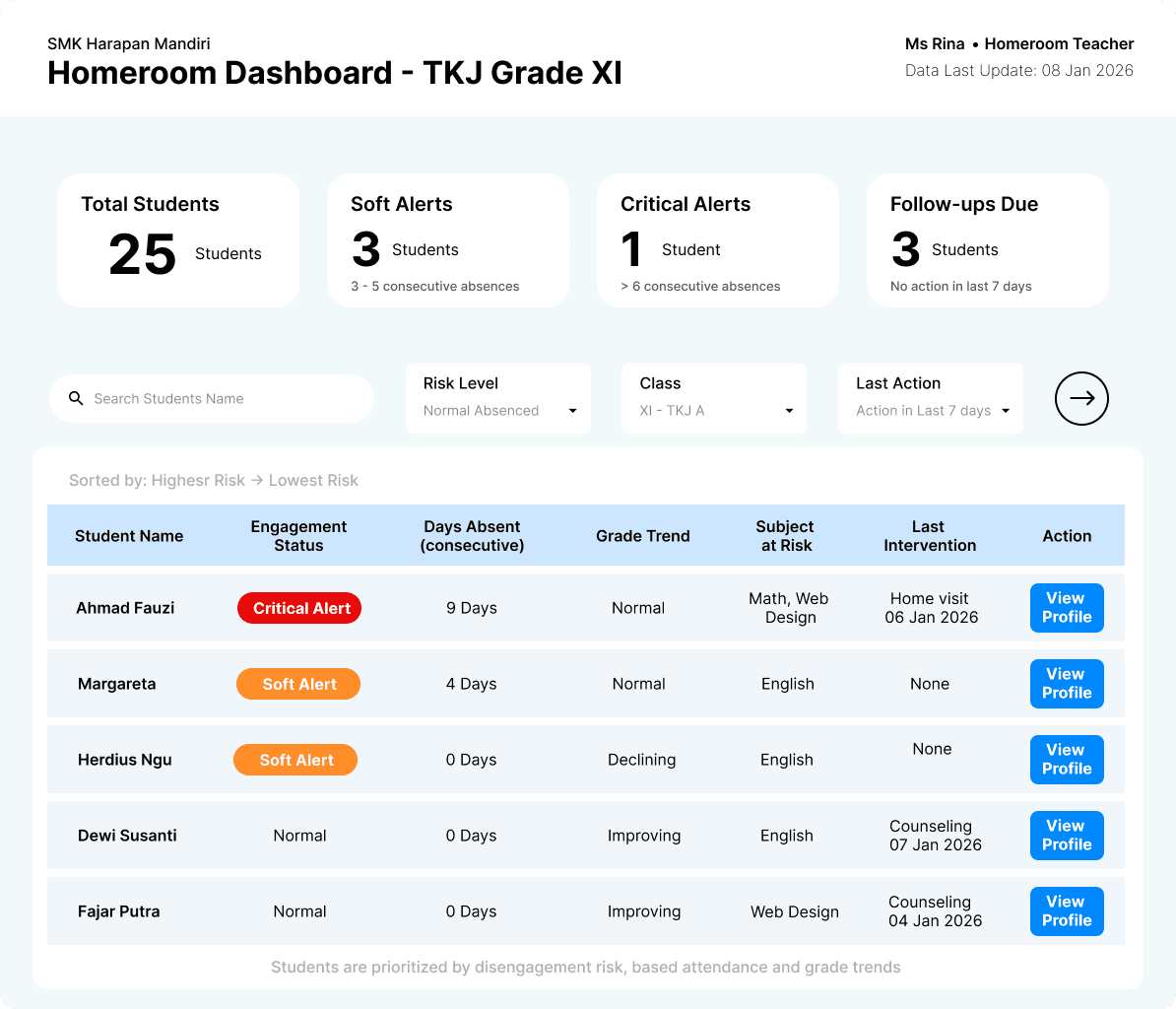
UX Rationale Highlights:
• Risk is shown as categorical states (Normal / Soft Alert / Critical Alert), not numeric scores
• Attendance and grade trends are surfaced side-by-side to prevent tunnel vision
• Intervention history is visible at a glance to avoid duplicate or forgotten actions
• Filters exist only for operational relevance (risk, class, last action)
• No charts, exports, or analytics are included — to preserve action focus
Student Profile Screen
The Student Profile screen aggregates fragmented signals into a single humane narrative. It shows:
• attendance deterioration
• grade trends per subject
• risk triggers
• past interventions
• parent communication status
The design avoids ranking, GPA, or predictive labels. Instead, it frames risk as a temporary condition that can be resolved through timely care.
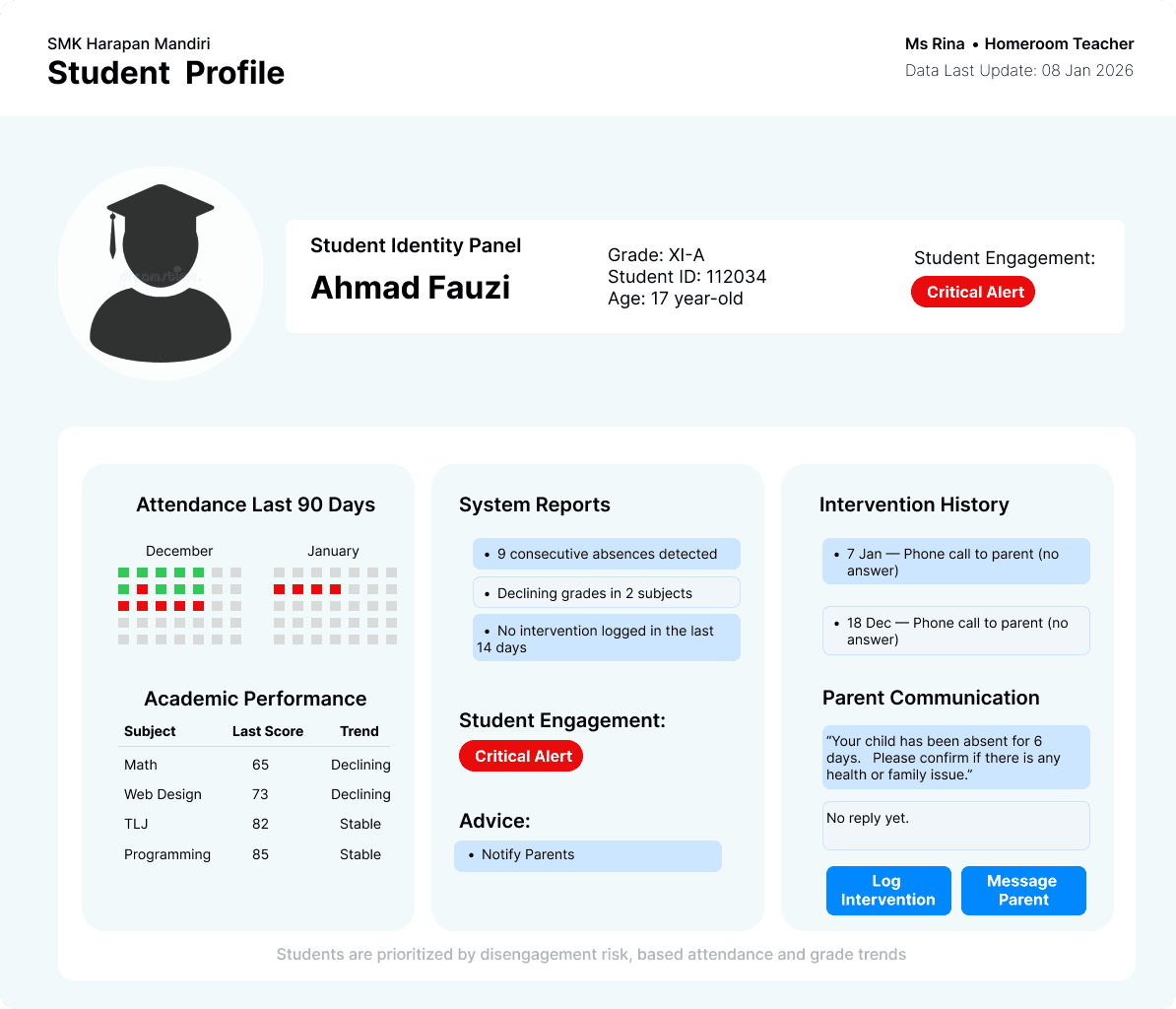
UX Rationale Highlights:
• Risk logic is explained in plain language
• Algorithms are made legible to avoid blind trust
• Attendance is shown as a timeline, not a percentage
• Emotional safety copy reinforces that the system supports care, not punishment
• Parent communication is embedded into the student context to prevent siloed action
Log Intervention Page
The Alert & Intervention screen transforms risk detection into institutional accountability. Closing the loop from signal to action.
Instead of escalating automatically, the system:
• explains why an alert was triggered
• shows deterioration over time
• suggests humane next actions
• requires a logged human response
This design ensures that alerts do not become ignored notifications or performative dashboards.
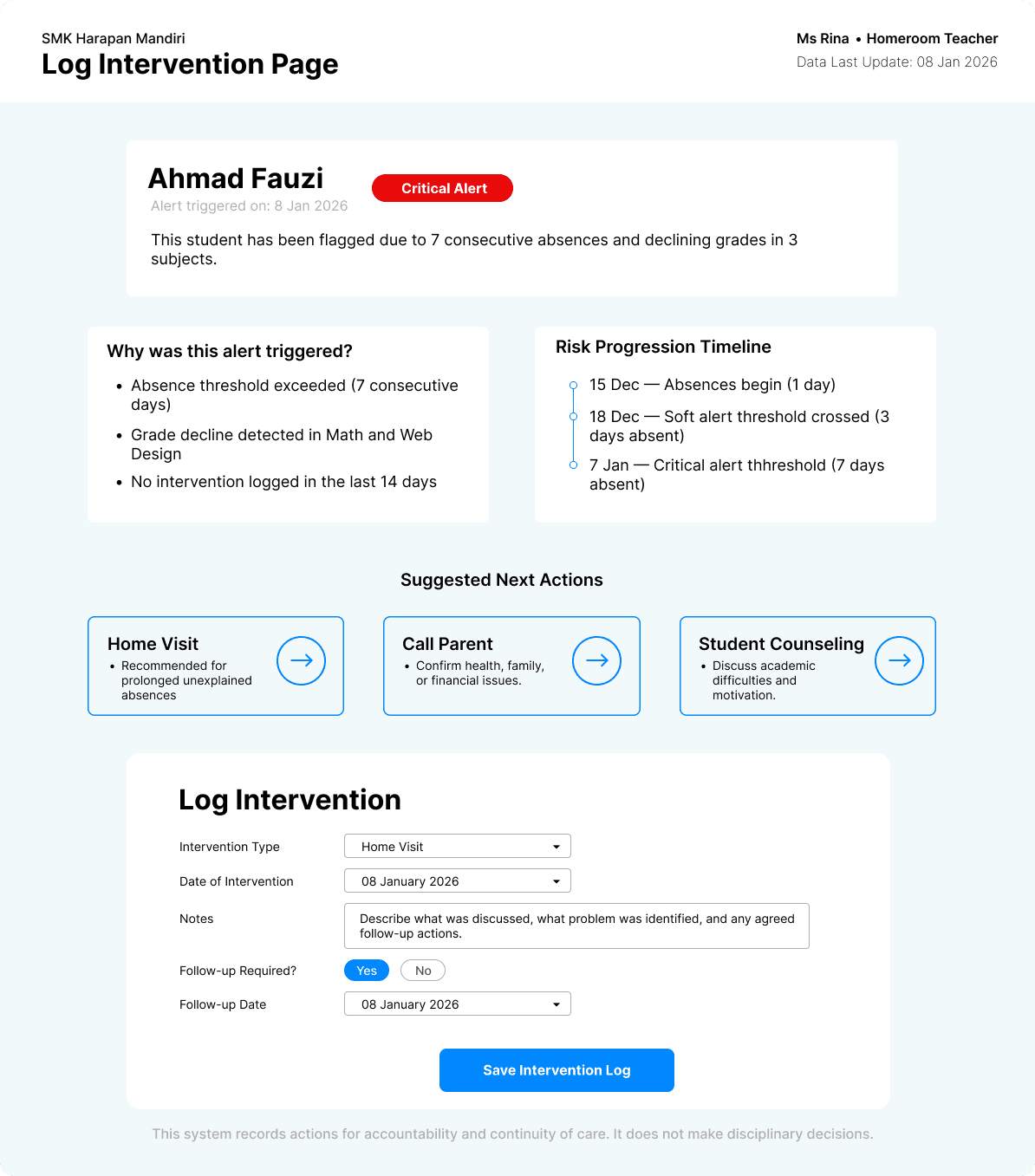
UX Rationale Highlights:
• Trigger logic is transparent to prevent algorithmic authority bias
• Suggested actions guide but do not command
• Logging an intervention is mandatory to close the alert
• Follow-up scheduling prevents one-off symbolic actions
• Governance copy clarifies that final decisions remain human
Ethical Safeguards
Several UX constraints were deliberately imposed to prevent misuse:
• No dropout probability scores
• No automatic disciplinary actions
• No ranking or labeling of students
• No data exports for external comparison
The system frames data as care signals and encodes institutional responsibility into interface flows. It treats early intervention as a moral obligation, not an optimization problem.
Outcome & Reflection
This project demonstrates how complex institutional rules, ethical constraints, and human realities can be translated into a calm, usable product. It shows that data systems in education should not optimize for efficiency alone — but for dignity, fairness, and earlier care.
More broadly, it illustrates how UX can be used not only to design interfaces, but to design better institutional behavior.