Project Duration
12 Weeks (Self-Initiated Project)
My Role
Business Analyst · Product Strategist
Tools Used
Figma, Lucidchart, Notion
Implementation
I translated the principles of the Early Warning System (EWS) from a conceptual framework into operational functionality. This transformation was guided by three primary objectives that shaped the system’s wireframe design:
Objective 1 – Information Architecture & Blueprints
Define the layout of critical data (such as risk scores and attendance timelines) to ensure efficient teacher workflows.
Objective 2 – Functional Prototyping
Develop high-fidelity wireframes to validate the logic-to-UI translation (how business rules and ethical foundations are represented as visual elements).
Objective 3 – Digital Inclusion (Adoption over Complexity)
Prioritize accessibility for users with varying levels of digital literacy and optimize offline functionality to ensure system responsiveness under different technical conditions.
Product Strategy and Focus
Product Strategy
The Early Warning System design focuses not only on dashboard visuals, but also on how effectively the system enables homeroom teachers to make fast and accurate decisions. Key design considerations include:
Early Risk Detection
The system must identify at-risk students before issues become permanent. The dashboard should immediately highlight high-priority students so homeroom teachers do not need to review all student data individually.Partial-Data Risk Awareness
In real school operations, data is often incomplete or delayed due to late input from subject teachers or administrative staff. Therefore, the system must still calculate and issue risk notifications even with partial data. Each alert includes notes on missing data, enabling homeroom teachers to verify with relevant staff.Low Adoption Barrier
Many teachers still rely on manual methods such as attendance books and Excel. The system must therefore be simple, familiar, and should not add additional administrative burden.Single Source of Truth
All student information—attendance, academic performance, and intervention history—must be consolidated into one integrated system to prevent data loss and duplication.Action-Oriented Interface
The dashboard should not only display data but also provide clear intervention steps such as contacting parents, recording actions, and scheduling follow-ups.Accountability
Each alert must have an intervention trail to ensure strong documentation for school decision-making.
This section demonstrates that the design is driven by system needs rather than purely aesthetic considerations.
Project Scope
In Scope
Out of Scope
Intervention priority dashboard with three risk categories (High, Medium, Low)
Mobile applications for students/parents
Integrated student profile combining attendance, academic performance, and intervention history in a single view
Parent portal
Automated alerts based on risk scores with specific action recommendations
Integration with external academic systems (e-report, Dapodik)
Intervention Log with mandatory recording fields (type, date, notes, follow-up)
SMS or email notifications
Offline-first mode where data is stored locally and synchronized automatically when a connection is available
Upload and storage of physical student documents (scanned grades, letters, administrative archives)
System generates risk scores even when one criterion is missing (partial data validation)
Machine learning–based predictive analytics
Role-based access for Homeroom Teachers, Counselors, Principal, and Administrative Staff
Integration with chat applications other than WhatsApp
WhatsApp Gateway notifications (editable message drafts, not automatic sending)
Real-time integration with government or education authority databases
Weekly automated reports to the Principal every Monday morning
Automated direct communication to parents without homeroom teacher approval
Technical Constraints
Optimized for laptop use; mobile view limited to a simplified dashboard and notifications
Data input is performed manually by administrative staff and subject teachers (no system integration yet)
Risk scoring is scheduled daily at 17:00 WIB, not in real-time
High-Fidelity Product Wireframe
This documentation covers critical functionalities and detailed user stories, designed to guide UI/UX designers and developers during the visual and technical implementation phases.
Main Dashboard
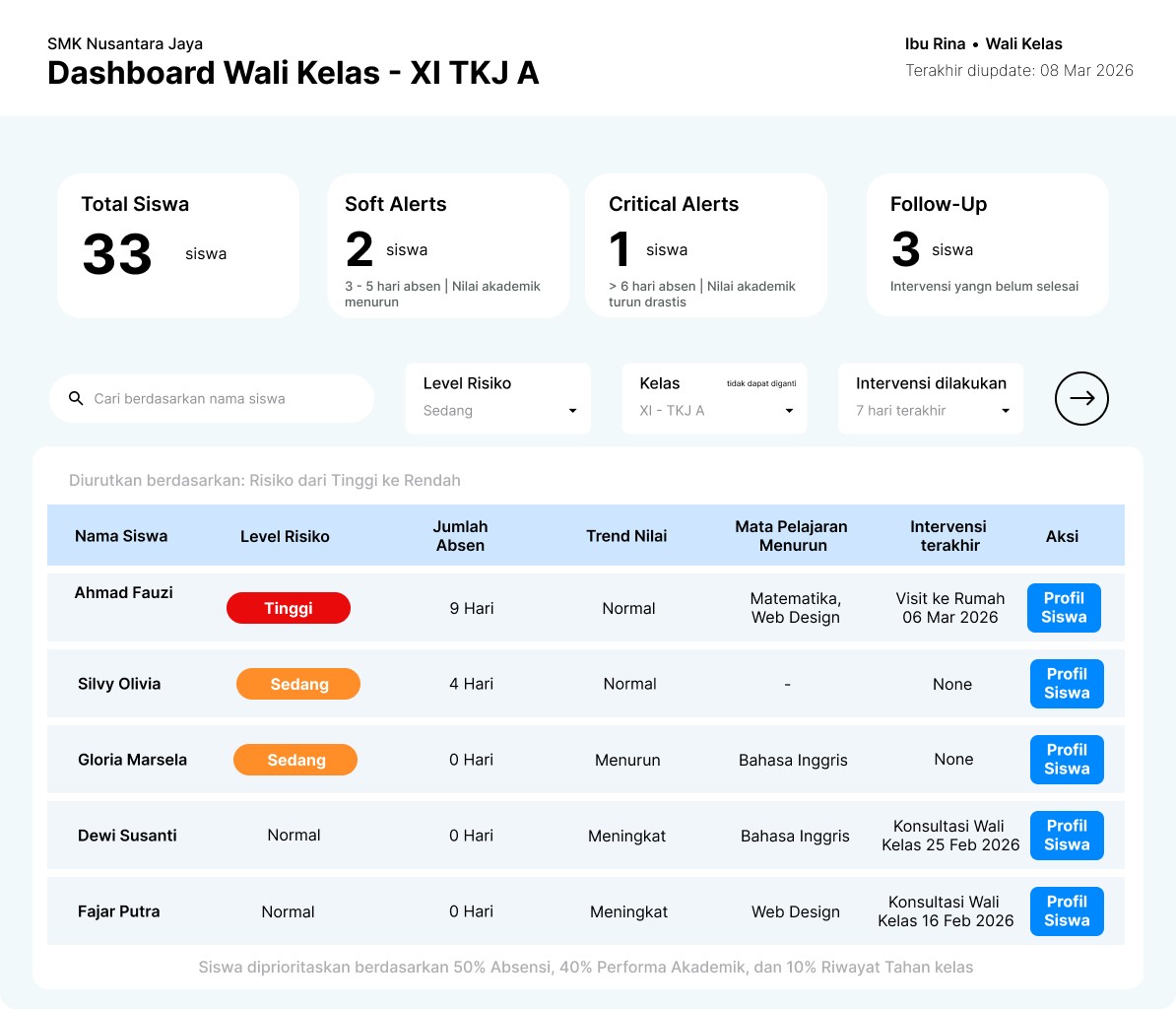
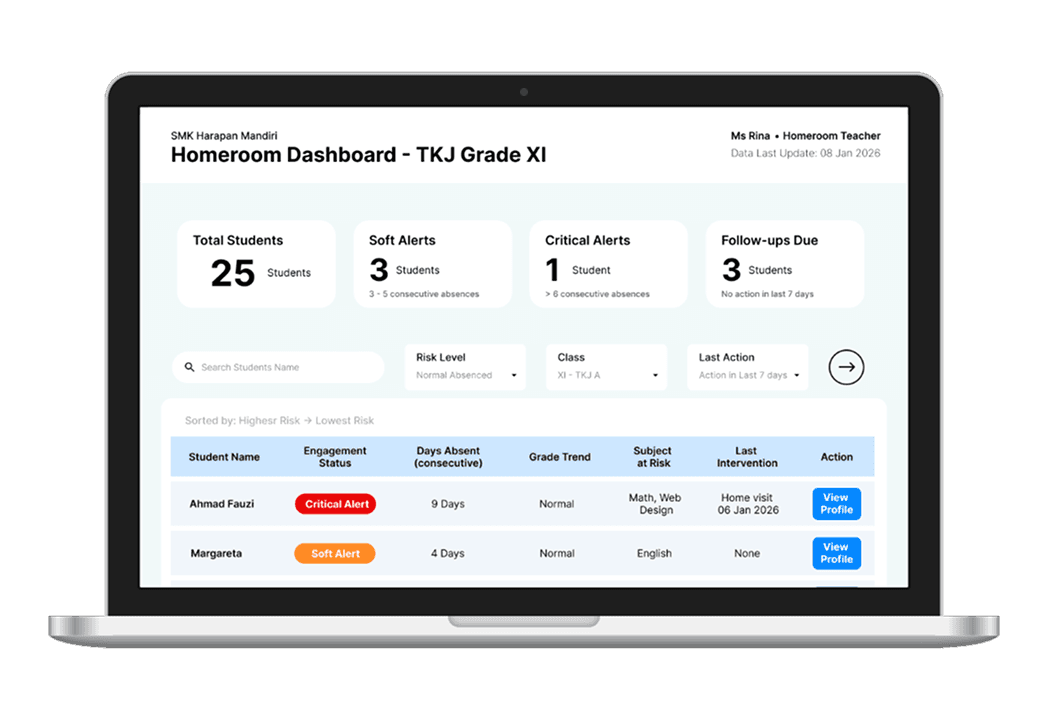
The dashboard serves as the central monitoring hub, directly displaying intervention priorities. The system automatically ranks students by risk level, enabling homeroom teachers to immediately focus on critical cases.
The absence column provides visibility into attendance patterns, while the last intervention column helps identify students who have not yet received any action.
Additional Key Features:
Search and Filter Buttons → quickly locate or filter students without scrolling
Call-to-Action → “View Profile” for deeper exploration
Student Profile Page
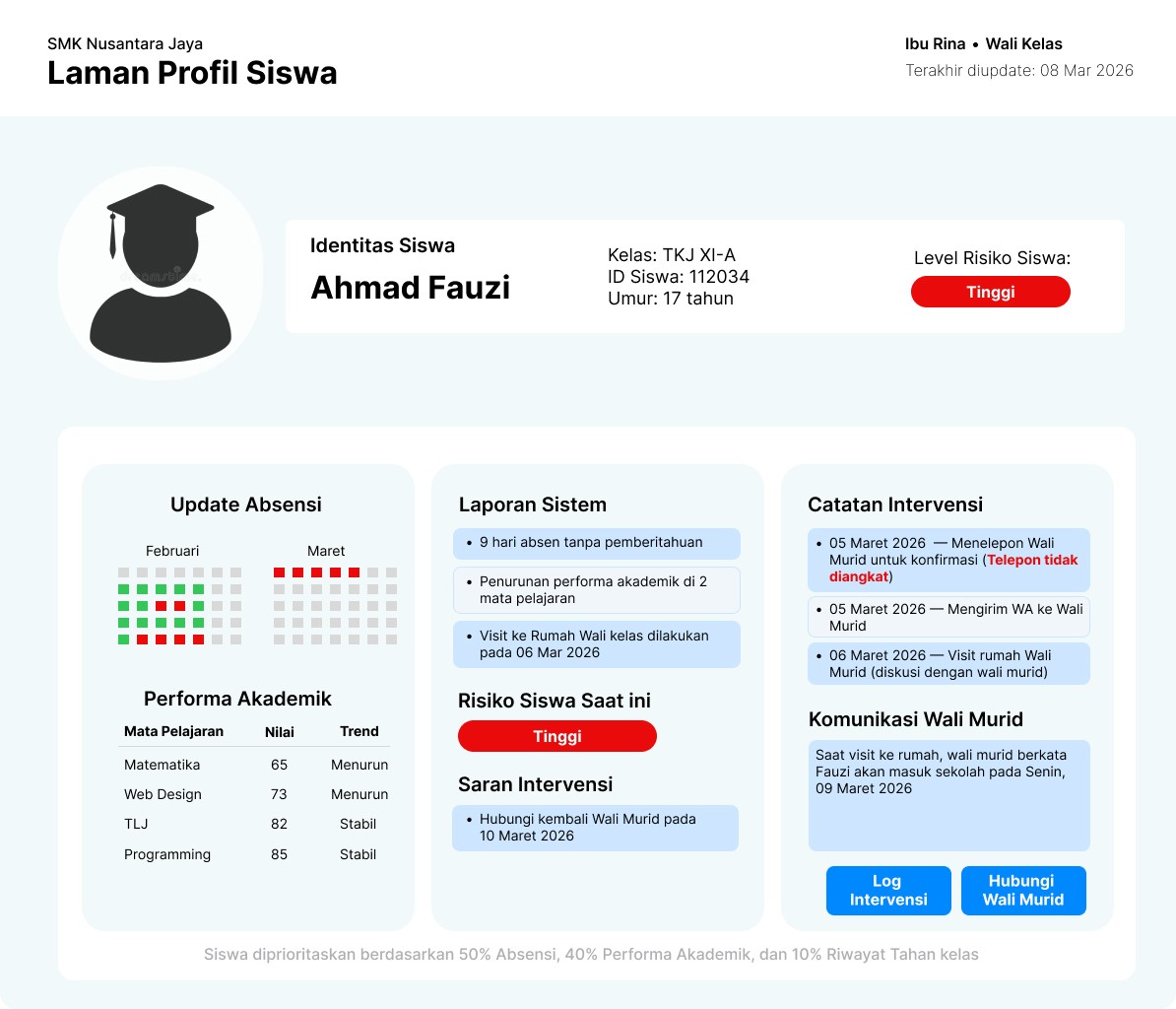
The student profile consolidates all relevant data, including attendance records, academic performance, and alert status, enabling homeroom teachers to gain a comprehensive understanding of each student’s condition.
Communication history with parents is also recorded, ensuring structured intervention processes. This page functions as the primary reference before taking action.
Additional Key Features:
Intervention Suggestions → guidance on recommended actions
Attendance History → visualized attendance patterns (planned for future enhancement)
Intervention Log Page
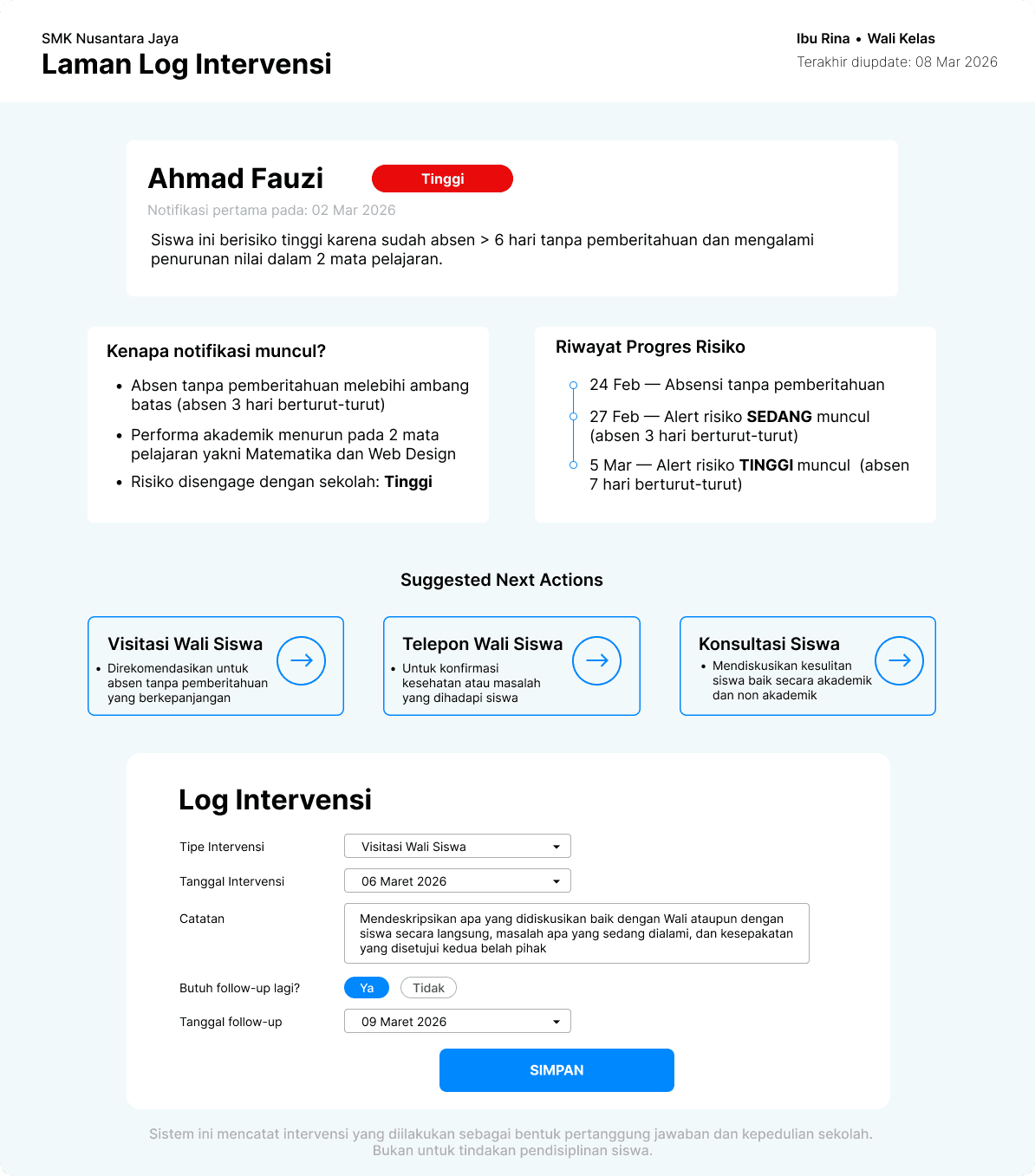
The intervention log explains the reason behind each alert, such as consecutive absences or declining grades. Homeroom teachers can then record actions taken, such as contacting parents, discussing with the student, or scheduling follow-ups.
Alerts are only cleared after interventions are recorded, ensuring that every warning is addressed. This reinforces the system’s role as a decision support tool rather than merely a data dashboard.
Additional Key Features:
Alert Reason Transparency → clear explanation of triggering factors
Risk Progress History → track attendance and academic performance trends over time
Success Metrics & Reflection
Success Metrics
The Early Warning System is designed to deliver measurable impact on student monitoring processes and intervention effectiveness. Targets focus on detection speed, risk identification accuracy, dropout reduction, and teacher workload efficiency.
Indicator
Success Metrics
Detection Delay
Target: -86%
Reduce risk identification time from over one month to less than 5 days, enabling early intervention before issues become permanent.
Risk Identification Accuracy
Target: +322%
Increase accuracy from 19.4% to 81.86% through integrated risk scoring and monitoring of attendance and academic performance.*
Dropout Rate
Target: -78%
Reduce dropout rate from 3.72% to 0.83% through early intervention and continuous monitoring.
Grade Retention Rate
Target: -78%
Decrease retention rate from 2.16% to 0.48% by detecting academic decline early in the semester.
Teacher Administrative Workload
Target: -88%
Reduce time spent on data reconciliation and monitoring from 4–6 hours per week to less than 30 minutes per week.
* The >80% target is based on the minimum effectiveness threshold of EWS in education literature (Ariqah & Anang, 2021).
Reflection
Key Considerations Before School Implementation
Data Quality and Input Consistency
Before implementation, it is critical to ensure that subject teachers and homeroom teachers are both committed and capable of inputting data accurately and on time. Regardless of how advanced the risk engine or slow decay logic is, the system will fail if the data is delayed or inaccurate.
It is essential to validate whether the EWS data input workflow is genuinely lighter—or at least equivalent—to current manual processes. Without strong user adoption at the grassroots level, the system risks becoming a visually appealing but underutilized dashboard.
Full Documentation
This Early Warning System project is supported by a comprehensive analytical report covering business process analysis, BPMN, system architecture, and detailed wireframe implementation.
Download Full Early Warning System Report (PDF)